

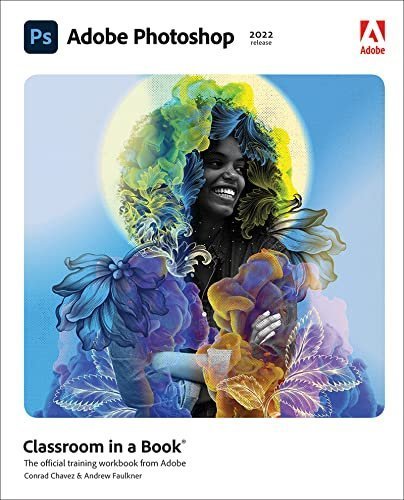
Adobe Photoshop Classroom in a Book 1st Edition by Conrad Chavez, ISBN-13: 978-0137621101
Original price was: $50.00.$19.99Current price is: $19.99.
Safe & secure checkout
Description
Description
Adobe Photoshop Classroom in a Book 1st Edition by Conrad Chavez, ISBN-13: 978-0137621101
[PDF eBook eTextbook]
- Publisher: Pearson; 1st edition (December 27, 2021)
- Language: English
- 416 pages
- ISBN-10: 0137621108
- ISBN-13: 978-0137621101
Learn to correct and improve digital images. Seamlessly remove backgrounds and repair images using content-aware tools. Explore advanced filters that enhance images using machine learning and cloud processing. Select subjects with complex outlines, including hair, quickly and precisely. Design composite images, including instant sky replacement. Create advanced typography. Edit video, including transitions and motion effects. Automate tasks with actions. Save as a Photoshop cloud document to easily edit across desktop and mobile devices. Export your work for web, mobile devices, and print.
The fastest, easiest, most comprehensive way to learn Adobe Photoshop
Classroom in a Book, the best-selling series of hands-on software training workbooks, offers what no other book or training program does―an official training series from Adobe, developed with the support of Adobe product experts.
Adobe Photoshop Classroom in a Book (2022 release) contains 15 lessons that cover the basics and beyond, providing countless tips and techniques to help you become more productive with the program. You can follow the book from start to finish or choose only those lessons that interest you.
Note: Classroom in a Book does not replace the documentation, support, updates, or any other benefits of being a registered owner of Adobe Photoshop software. This book covers Photoshop on desktop only. It does not address Photoshop on the iPad.
Table of Contents:
Cover Page
Title Page
Copyright Page
Where are the Lesson Files?
Contents
Getting Started
About Classroom in a Book
What’s new in this edition
Prerequisites
Installing Adobe Photoshop, Adobe Bridge, and Adobe Camera Raw
Installing fonts
Starting Adobe Photoshop
Online content
Restoring default preferences
Additional resources
Adobe Authorized Training Centers
1. Getting to Know the Work Area
Starting to work in Adobe Photoshop
Using the tools
Sampling a color
Working with tools and tool properties
Undoing actions in Photoshop
More about panels and panel locations
Review questions
Review answers
2. Basic Photo Corrections
Strategy for retouching
Resolution and image size
Opening a file with Adobe Bridge
Straightening and cropping the image in Photoshop
Adjusting the color and tone
Using the Spot Healing Brush tool
Applying a content-aware patch
Repairing areas with the Clone Stamp tool
Sharpening the image
Review questions
Review answers
3. Working with Selections
About selecting and selection tools
Getting started
Using Cloud Documents
Using the Magic Wand tool
Using the Quick Selection tool
Moving a selected area
Using the Object Selection tool
Manipulating selections
Selecting with the lasso tools
Rotating a selection
Selecting with the Magnetic Lasso tool
Selecting from a center point
Resizing and copying a selection
Cropping an image
Review questions
Review answers
4. Layer Basics
About layers
Getting started
Using the Layers panel
Rearranging layers
Applying a gradient to a layer
Applying a layer style
Adding an adjustment layer
Updating layer effects
Adding a border
Flattening and saving files
Review questions
Review answers
5. Quick Fixes
Getting started
Improving a snapshot
Adjusting facial features with Liquify
Blurring a background
Creating a panorama
Filling empty areas when cropping
Correcting image distortion
Extending depth of field
Removing objects using Content-Aware Fill
Adjusting perspective in an image
Review questions
Review answers
6. Masks and Channels
Working with masks and channels
Getting started
Using Select And Mask and Select Subject
Creating a quick mask
Manipulating an image with Puppet Warp
Using an alpha channel to create a shadow
Creating a pattern for the background
Review questions
Review answers
7. Typographic Design
About type
Getting started
Creating a clipping mask from type
Creating type on a path
Warping point type
Designing paragraphs of type
Finishing up
Review questions
Review answers
8. Vector Drawing Techniques
About bitmap images and vector graphics
About paths and the Pen tool
Getting started
Drawing a shape with the Pen tool
Drawing a path traced from a photo
Converting a path to a selection and a layer mask
Creating a logo with text and a custom shape
Review questions
Review answers
9. Advanced Compositing
Getting started
Arranging layers
Using Smart Filters
Painting a layer
Adding a background
Using the History panel to undo edits
Improving a low-resolution image
Review questions
Review answers
10. Painting with the Mixer Brush
About the Mixer Brush
Getting started
Selecting brush settings
Mixing colors
Mixing colors with a photograph
Painting and mixing colors with brush presets
Review questions
Review answers
11. Editing Video
Getting started
About the Timeline panel
Creating a new video
Animating text with keyframes
Creating effects
Adding transitions
Adding audio
Muting unwanted audio
Rendering video
Review questions
Review answers
12. Working with Camera Raw
Getting started
About camera raw files
Processing files in Camera Raw
Applying advanced color correction
Review questions
Review answers
13. Preparing Files for the Web
Getting started
Creating placeholders with the Frame tool
Using layer groups to create button graphics
Automating a multistep task
Designing with artboards
Review questions
Review answers
14. Producing and Printing Consistent Color
Preparing files for printing
Getting started
Performing a “zoom test”
About color management
Specifying color management defaults
Identifying out-of-gamut colors
Proofing document colors on a monitor
Bringing colors into the output gamut
Converting an image to CMYK
Saving the image as Photoshop PDF
Printing a CMYK image from Photoshop
Review questions
Review answers
15. Exploring Neural Filters
Understanding Neural Filters
Getting started
Exploring the Neural Filters workspace
Improving complexion with Skin Smoothing
Review questions
Review answers
Appendixes
Appendix: Tools panel overview
Appendix: Keyboard shortcuts
Index
Pearson’s Commitment to Diversity, Equity, and Inclusion
Production Notes
Conrad Chavez writes about digital photography and Adobe Creative Cloud workflows. Conrad is the author or co-author of many books, including Adobe Photoshop Classroom in a Book (since the 2015 release) and the last three editions of Real World Adobe Photoshop for Photographers. He also writes articles for publications such asCreativePro.com and InDesign Magazine. He is also a photographer. You can learn more about Conrad at his website, www.conradchavez.com.
Andrew Faulkner is the founder and creative guru at Afstudio Design, with 25+ years in providing design and photo-illustration services to a long list of corporate clients. Hiswork with Adobe Systems started in 1994, when they invited him to help develop the first Adobe Classroom in a Book. Andrew has co-authored numerous editions of theClassroom in a Book series on Photoshop, After Effects, and Flash.In addition to his graphic design work, he is a veteran Photoshop-jockey, and his digital collage illustration work has been featured in The Wall Street Journal, The New YorkTimes, The LA Times, and The Washington Post. His recent digital painting work can be seen online at andrew-faulkner.com. When Andrew’s not at the studio, you canprobably find him hunting down rare vinyl at one of the Bay Area’s vintage record stores.”
What makes us different?
• Instant Download
• Always Competitive Pricing
• 100% Privacy
• FREE Sample Available
• 24-7 LIVE Customer Support


Reviews
There are no reviews yet.