

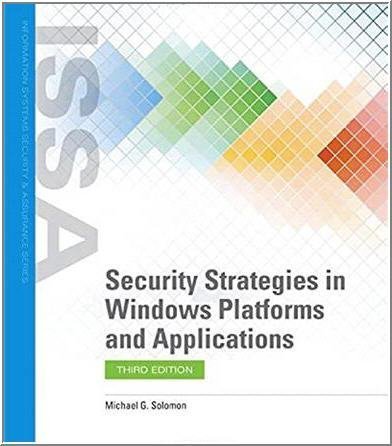
Security Strategies in Windows Platforms and Applications 3rd Edition by Michael G. Solomon, ISBN-13: 978-1284175622
Original price was: $50.00.$14.99Current price is: $14.99.
Safe & secure checkout
Description
Description
Security Strategies in Windows Platforms and Applications 3rd Edition by Michael G. Solomon, ISBN-13: 978-1284175622
[PDF eBook eTextbook]
- Publisher: Jones & Bartlett Learning; 3rd edition (October 23, 2019)
- Language: English
- 374 pages
- ISBN-10: 1284175626
- ISBN-13: 978-1284175622
Revised and updated to keep pace with this ever changing field, Security Strategies in Windows Platforms and Applications, Third Edition focuses on new risks, threats, and vulnerabilities associated with the Microsoft Windows operating system, placing a particular emphasis on Windows 10, and Windows Server 2016 and 2019. The Third Edition highlights how to use tools and techniques to decrease risks arising from vulnerabilities in Microsoft Windows operating systems and applications. The book also includes a resource for readers desiring more information on Microsoft Windows OS hardening, application security, and incident management. With its accessible writing style, and step-by-step examples, this must-have resource will ensure readers are educated on the latest Windows security strategies and techniques.
Table of Contents:
Preface
Acknowledgments
About the Author
PART I The Microsoft Windows Security Situation
CHAPTER 1 Microsoft Windows and the Threat Landscape
Information Systems Security
Tenets of Information Security: The C-I-A Triad
Confidentiality
Integrity
Availability
Mapping Microsoft Windows and Applications into a Typical IT Infrastructure
Windows Clients
Windows Servers
Microsoft’s End-User License Agreement
Windows Threats and Vulnerabilities
Anatomy of Microsoft Windows Vulnerabilities
CryptoLocker
Locky
WannaCry
Discovery-Analysis-Remediation Cycle
Discovery
Analysis
Remediation
Common Forms of Attack
CHAPTER SUMMARY
KEY CONCEPTS AND TERMS
CHAPTER 1 ASSESSMENT
CHAPTER 2 Security in the Microsoft Windows Operating System
Operating System Components and Architecture
The Kernel
Operating System Components
Basic Windows Operating System Architecture
Windows Run Modes
Kernel Mode
User Mode
Access Controls and Authentication
Authentication Methods
Access Control Methods
Security Access Tokens, Rights, and Permissions
Security Identifier
Access Rules, Rights, and Permissions
Users, Groups, and Active Directory
Workgroups
Active Directory
Windows Attack Surfaces and Mitigation
Multilayered Defense
Mitigation
Fundamentals of Microsoft Windows Security Monitoring and Maintenance
Security Monitoring
Identify Vulnerabilities
CHAPTER SUMMARY
KEY CONCEPTS AND TERMS
CHAPTER 2 ASSESSMENT
PART II Managing and Maintaining Microsoft Windows Security
CHAPTER 3 Access Controls in Microsoft Windows
The Principle of Least Privilege
The Orange Book
Least Privilege and LUAs
Rights and Permissions
Access Models: Identification, Authentication, Authorization, ACLs, and More
Windows Server 2012, Windows Server 2016, and Windows Server 2019 Dynamic Access Control
User Account Control
Sharing SIDs and SATs
Managed Service Accounts
Kerberos
Windows Objects and Access Controls
Windows DACLs
DACL Advanced Permissions
SIDs, Globally Unique Identifiers, and Class Identifiers
Calculating Microsoft Windows Access Permissions
Auditing and Tracking Windows Access
Expression-Based Security Audit Policy (Windows Server 2012 and Newer)
Microsoft Windows Access Management Tools
Cacls.exe
Icacls.exe
Best Practices for Microsoft Windows Access Control
CHAPTER SUMMARY
KEY CONCEPTS AND TERMS
CHAPTER 3 ASSESSMENT
CHAPTER 4 Microsoft Windows Encryption Tools and Technologies
Encryption Methods Microsoft Windows Supports
Encrypting File System, BitLocker, and BitLocker To Go
Encrypting File System
BitLocker
BitLocker To Go
Enabling File-, Folder-, and Volume-Level Encryption
Enabling EFS
Enabling BitLocker
Enabling BitLocker To Go
Encryption in Communications
Encryption Protocols in Microsoft Windows
TLS
IPSec
Virtual Private Network
Wireless Security
Microsoft Windows and Security Certificates
Public Key Infrastructure
Best Practices for Windows Encryption Techniques
CHAPTER SUMMARY
KEY CONCEPTS AND TERMS
CHAPTER 4 ASSESSMENT
CHAPTER 5 Protecting Microsoft Windows against Malware
The Purpose of Malware
Types of Malware
Virus
Worm
Trojan Horse
Rootkit
Spyware
Ransomware
Malware Type Summary
Anti-Malware Software
Antivirus Software
Anti-Spyware Software
Malware Mitigation Techniques
Importance of Updating Your Software
Maintaining a Malware-Free Environment
Scanning and Auditing Malware
Tools and Techniques for Removing Malware
Malware Prevention Best Practices
CHAPTER SUMMARY
KEY CONCEPTS AND TERMS
CHAPTER 5 ASSESSMENT
CHAPTER 6 Group Policy Control in Microsoft Windows
Group Policy and Group Policy Objects
Group Policy Settings
GPO Linking
Making Group Policy Conform to Security Policy
Security Responsibility
Security Policy and Group Policy
Group Policy Targets
Types of GPOs in the Registry
Local Group Policy Editor
GPOs in the Registry Editor
Types of GPOs in Active Directory
Group Policy Management Console
GPOs on the Domain Controller
Designing, Deploying, and Tracking Group Policy Controls
GPO Application Order
Security Filters
GPO Windows Management Instrumentation Filters
Deploying Group Policy
Auditing and Managing Group Policy
Group Policy Inventory
Analyzing the Effect of GPOs
Best Practices for Microsoft Windows Group Policy and Processes
Group Policy Design Guidelines
CHAPTER SUMMARY
KEY CONCEPTS AND TERMS
CHAPTER 6 ASSESSMENT
CHAPTER 7 Microsoft Windows Security Profile and Audit Tools
Profiling Microsoft Windows Security
Profiling
Profiling Windows Computers
Microsoft Baseline Security Analyzer
MBSA Graphical User Interface
MBSA Command-Line Interface
OpenVAS
Nessus Essentials
Burp Suite Web Vulnerability Scanner
Microsoft Windows Security Audit
Microsoft Windows Security Audit Tools
Best Practices for Microsoft Windows Security Audits
CHAPTER SUMMARY
KEY CONCEPTS AND TERMS
CHAPTER 7 ASSESSMENT
CHAPTER 8 Microsoft Windows Backup and Recovery Tools
Microsoft Windows Operating System and Application Backup and Recovery
The Need for Backups
The Backup Process
The Restore Process
Workstation, Server, Network, and Cloud Backup Techniques
Workstation Backups
Server Backups
Network Backups
Cloud Backups
Microsoft Windows and Application Backup and Recovery in a Business Continuity Setting
Disaster Recovery Plan
Business Continuity Plan
Where a Restore Fits In
Microsoft Windows Backup and Restore Utility
Restoring with the Windows Backup and Restore Utility
Restoring with the Windows Server Recovery Utility
Rebuilding Systems from Bare Metal
Managing Backups with Virtual Machines
Best Practices for Microsoft Windows Backup and Recovery
CHAPTER SUMMARY
KEY CONCEPTS AND TERMS
CHAPTER 8 ASSESSMENT
CHAPTER 9 Microsoft Windows Network Security
Network Security
Network Security Controls
Principles of Microsoft Windows Network Security
Common Network Components
Connection Media
Networking Devices
Server Computers and Services Devices
Microsoft Windows Security Protocols and Services
Securing Microsoft Windows Environment Network Services
Service Updates
Service Accounts
Necessary Services
Securing Microsoft Windows Wireless Networking
Microsoft Windows Workstation Network Security
User Authorization and Authentication
Malicious Software Protection
Outbound Traffic Filtering
Microsoft Windows Server Network Security
Authentication and Authorization
Malicious Software Protection
Network Traffic Filtering
Internal Network and Cloud Security
IPv4 versus IPv6
Cloud Computing
Best Practices for Microsoft Windows Network Security
CHAPTER SUMMARY
KEY CONCEPTS AND TERMS
CHAPTER 9 ASSESSMENT
CHAPTER 10 Microsoft Windows Security Administration
Security Administration Overview
The Security Administration Cycle
Security Administration Tasks
Maintaining the C-I-A Triad in the Microsoft Windows OS World
Maintaining Confidentiality
Maintaining Integrity
Maintaining Availability
Microsoft Windows OS Security Administration
Firewall Administration
Performance Monitor
Backup Administration
Operating System Service Pack Administration
Group Policy Administration
DACL Administration
Encryption Administration
Anti-Malware Software Administration
Ensuring Due Diligence and Regulatory Compliance
Due Diligence
The Need for Security Policies, Standards, Procedures, and Guidelines
Best Practices for Microsoft Windows OS Security Administration
CHAPTER SUMMARY
KEY CONCEPTS AND TERMS
CHAPTER 10 ASSESSMENT
PART III Microsoft Windows OS and Application Security Trends and Directions
CHAPTER 11 Hardening the Microsoft Windows Operating System
Understanding the Hardening Process and Mindset
Strategies to Secure Windows Computers
Install Only What You Need
Security Compliance Toolkit
Manually Disabling and Removing Programs and Services
Hardening Microsoft Windows Operating System Authentication
Hardening the Network Infrastructure
Securing Directory Information and Operations
Hardening Microsoft Windows OS Administration
Hardening Microsoft Servers and Client Computers
Hardening Server Computers
Hardening Workstation Computers
Hardening Data Access and Controls
Hardening Communications and Remote Access
Authentication Servers
VPNs and Encryption
Hardening PKI
User Security Training and Awareness
Best Practices for Hardening Microsoft Windows OS and Applications
CHAPTER SUMMARY
KEY CONCEPTS AND TERMS
CHAPTER 11 ASSESSMENT
CHAPTER 12 Microsoft Application Security
Principles of Microsoft Application Security
Common Application Software Attacks
Hardening Applications
Securing Key Microsoft Client Applications
Web Browser
Email Client
Productivity Software
File Transfer Software
AppLocker
Securing Key Microsoft Server Applications
Web Server
Email Server
Database Server
Enterprise Resource Planning Software
Line of Business Software
Cloud-Based Software
Case Studies in Microsoft Application Security
Best Practices for Securing Microsoft Windows Applications
CHAPTER SUMMARY
KEY CONCEPTS AND TERMS
CHAPTER 12 ASSESSMENT
CHAPTER 13 Microsoft Windows Incident Handling and Management
Understanding and Handling Security Incidents Involving Microsoft Windows OS and Applications
Formulating an Incident Response Plan
Plan Like a Pilot
Plan for Anything that Could Cause Loss or Damage
Build the CSIRT
Plan for Communication
Plan Security
Revision Procedures
Plan Testing
Handling Incident Response
Preparation
Identification
Containment
Eradication
Recovery
Lessons Learned
Incident Handling and Management Tools for Microsoft Windows and Applications
Investigating Microsoft Windows and Applications Incidents
Acquiring and Managing Incident Evidence
Types of Evidence
Chain of Custody
Evidence Collection Rules
Best Practices for Handling Microsoft Windows OS and Applications Incidents and Investigations
CHAPTER SUMMARY
KEY CONCEPTS AND TERMS
CHAPTER 13 ASSESSMENT
CHAPTER 14 Microsoft Windows and the Security Life Cycle
Understanding Traditional System Life Cycle Phases
Agile Software Development
Managing Microsoft Windows OS and Application Software Security
Developing Secure Microsoft Windows OS and Application Software
Implementing, Evaluating, and Testing Microsoft Windows OS and Application Software Security
Maintaining the Security of Microsoft Windows OS and Application Software
Microsoft Windows OS and Application Software Revision, Change Management, and End-of-Life
Phaseout
Software Development Areas of Difficulty
Software Control
Software Configuration Management
Best Practices for Microsoft Windows and Application Software Development Security
Investigations
CHAPTER SUMMARY
KEY CONCEPTS AND TERMS
CHAPTER 14 ASSESSMENT
CHAPTER 15 Best Practices for Microsoft Windows and Application Security
Basic Rules of Microsoft Windows OS and Application Security
Administrative best practices
Technical best practices
Audit and Remediation Cycles
Security Policy Conformance Checks
Security Baseline Analysis
OS and Application Checks and Upkeep
Network Management Tools and Policies
Software Testing, Staging, and Deployment
Compliance/Currency Tests on Network Entry
Trends in Microsoft Windows OS and Application Security Management
CHAPTER SUMMARY
KEY CONCEPTS AND TERMS
CHAPTER 15 ASSESSMENT
APPENDIX A Answer Key
APPENDIX B Standard Acronyms
Glossary of Key Terms
References
Index
Michael G. Solomon, PhD, CISSP, PMP, CISM, CySA+, Pentest+, is an author, educator, and consultant focusing on privacy, security, blockchain, and identity management. As an IT professional and consultant since 1987, Dr. Solomon has led project teams for many Fortune 500 companies and has authored and contributed to more than 30 books and numerous training courses. Dr. Solomon is a Professor of Computer and Information Sciences at the University of the Cumberlands and holds a Ph.D. in Computer Science and Informatics from Emory University.
What makes us different?
• Instant Download
• Always Competitive Pricing
• 100% Privacy
• FREE Sample Available
• 24-7 LIVE Customer Support
Reviews
There are no reviews yet.